
The Contour Map Generator Built for Designers (Not Engineers)
Most contour map tools online are built for engineers who need DXF files. Here is what designers actually need — and why I built TopoLines to fill that gap.
The Contour Map Generator Built for Designers
If you have ever tried to pull topographic contour lines for a design project — a poster, a map print, a branded landscape illustration — you have likely ended up somewhere like ContourMap.app. It works. You select an area, you get a contour map, you download something. But what you get is a file built for civil engineers, not for Figma.
That gap is exactly why I built [TopoLines](https://topolines.app).
The Problem With Most Contour Map Tools
Most online contour map generators are designed around a single use case: an architect or civil engineer needs elevation data for a site analysis. They need a DXF for AutoCAD. They need a Shapefile for their GIS pipeline. They need KMZ for Google Earth. Those are legitimate needs — but they have nothing to do with why a designer reaches for topographic lines.
ContourMap.app, the most visible tool in this space, exports to DXF, DWG, Shapefile, GeoJSON, and KMZ. The pricing model charges $9 per map. The interface is a stripped-back single-page tool optimised for selecting an area and downloading data. It does that well. But ask it for a layered SVG organised by elevation band, or a clean vector you can paste directly into Figma, or contour lines that fade from deep green to pale sand as altitude rises — it has nothing for you.
The problem is structural: these tools treat the contour line as a measurement output. Designers need it to behave as a design element.
What Designers Actually Need From Contour Lines
When a designer reaches for topographic lines, the goal is visual, not geodetic. You want terrain texture for a book cover. A brand identity that evokes a specific landscape. A poster of a mountain you climbed. A product shot with an elevation pattern in the background. The accuracy you care about is visual accuracy — that the lines feel right, flow naturally, and export in a format you can actually work with.
That means SVG. Not a generic SVG dump, but a structured one: paths grouped by elevation level, consistent stroke attributes, something that behaves properly when you open it in Illustrator or drop it into a Figma frame. You need to adjust stroke weight without regenerating from scratch. You need elevation gradients — the cartographic technique that immediately reads as "mountain map" to any viewer. And you need a tool that does not charge you per export like you are ordering satellite imagery for a construction site.
None of that is exotic. But you will not find it in a tool built around DXF output.
What TopoLines Does Differently
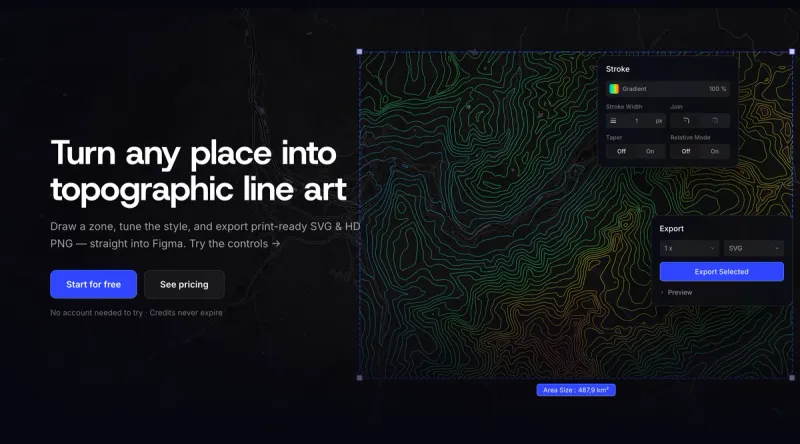
I built TopoLines starting from the designer workflow, not the surveyor's. SVG is the native output format — structured exactly the way you would want it: paths layered by elevation band, with real vector geometry that scales infinitely. Whether you are exporting for a 100px web component or a 3-metre exhibition print, the lines stay crisp because they are curves, not pixels.
The terrain data is solid. Free accounts use 30 m SRTM resolution, which is perfectly readable for most zones. Pro unlocks 10 m GeoTIFF — a meaningful step up for mountain ranges, coastlines, or anywhere fine contour detail actually matters to the composition. It is the same elevation data that cartographers and geographers use, just surfaced through an interface that does not assume you know what a GeoTIFF is.
Styling is live. You set a contour interval, adjust stroke width, toggle an elevation gradient that colours each line by its altitude value, and watch the map update in real time. Taper mode adds weight variation by elevation — thinner at lower altitudes, heavier near the peaks — which produces that hand-drawn, three-dimensional cartographic depth without any post-production. When it looks right, you export. SVG copies straight to your clipboard so you can paste directly into Figma without touching the file system once.
Batch export works across multiple zones. Draw several areas across the map, export them all at once, each automatically named by its nearest city. If you are building a collection of mountain prints or a brand system that references several landscapes, that is the workflow — draw everything, export once.
The Use Cases Where It Actually Shines
The tool finds its natural audience in three places. First, independent designers and illustrators who want topographic texture for print products — posters, risographs, map art — and need clean SVG they can colour and manipulate freely in their design software. Second, brand designers working with clients in outdoor, sport, travel, or architecture, where a landscape reference is part of the visual identity rather than a data source. Third, product teams and startups building interfaces, landing pages, or marketing materials where an elevation map background adds depth and geographic specificity without requiring a photograph.
In all three cases, the critical need is the same: a vector file that behaves like a design asset, not a geography dataset.
Where ContourMap.app Still Wins
A fair comparison requires honesty. If you are an architect who needs to hand a site elevation model off to a CAD workflow, ContourMap.app is the right tool. Its DXF and DWG outputs are clean and production-ready in a way that is outside TopoLines' scope. The LiDAR option pulls from high-accuracy surveying data where available — genuinely relevant for site planning.
But if your output is a creative file — something heading into Figma, Illustrator, a poster, or a brand presentation — you will spend more time cleaning up a ContourMap export than it takes to generate the same result from scratch in TopoLines. The SVG ContourMap produces is flat, unstructured, and clearly an afterthought. It is built to be viewed, not designed with.
The Pricing Logic
ContourMap charges $9 per map. One map, one download. TopoLines runs on a credit model — 50 credits for €5, 100 for €10, 500 for €35 — and credits never expire. A single pack unlocks all Pro features permanently on your account.
For a designer who iterates — who draws six different zones before finding the one that actually works for the layout, who comes back to a project three months later — this matters. You should not be paying per export when you do not yet know which version of the map you will use. The free tier covers one zone up to 100 km² with 30 m terrain and core styling. It is enough to understand whether the tool genuinely fits your workflow before spending anything.
A Tool That Knows What It Is
Every tool is built for someone. ContourMap.app is built for the person who knows what a KMZ file is and exactly why they need it. TopoLines is built for the person who wants topographic contour lines that look right inside a design file, generate from any point on earth in under a minute, and do not require knowing the difference between a Shapefile and a GeoJSON to operate.
If you are a designer reaching for topographic texture — for a personal project, a client deliverable, or a product that lives downstream of Figma — there is a version of this workflow that does not involve wrestling with geographic data formats at all.
Try it ! The first zone is free, no account required.
Try it at topolines.app