
Apple Liquid Glass: the most divisive redesign since iOS 7 — and what it means for us
Apple just shipped its biggest UI overhaul since 2013. Designers are split. Here’s an honest take on what Liquid Glass actually gets right, what it gets wrong, and what it signals for all of us.
I’ve been using iOS 26 since it shipped. And I have opinions.
Not the “this is beautiful, the future is here” kind — and not the “Apple has lost the plot, this is hostile design” kind either. Both camps exist loudly on design Twitter, and both are missing the point.
Liquid Glass is the most interesting thing Apple has done to interface design in over a decade. It’s also, in its current state, genuinely broken in places. And understanding why it’s broken tells you something important about where interface design is going — and where your work as a designer fits into that.
Let me try to be specific.
What it actually is
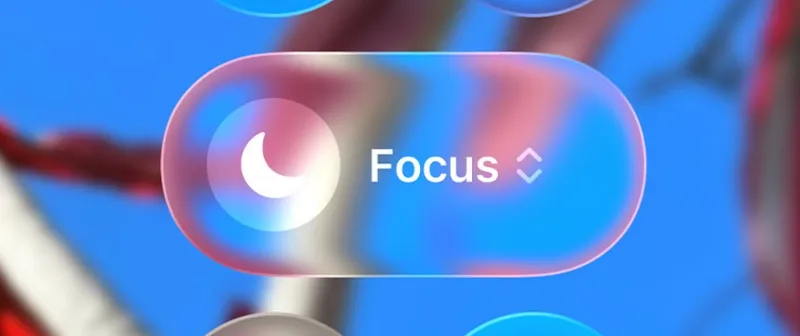
In case you’ve been offline: iOS 26, iPadOS 26, and macOS Tahoe shipped with a completely new design language Apple calls Liquid Glass. It’s translucent, layered, and motion-responsive. UI elements refract the content behind them in real time. Tab bars, navigation controls, icons, and widgets are all rebuilt around this material. The lock screen clock wraps behind your wallpaper subject. The dock shimmers. Everything floats.
Apple describes it as the synthesis of everything they’ve learned since Aqua in 2000 — the depth of visionOS, the motion of iPhone X’s Dynamic Island, the fluidity of iOS 7’s gesture layer — compressed into a single coherent material that works across every screen they make.
Whether or not you love the result, the engineering behind it is genuinely impressive. This isn’t a style update. It’s a rendering system.
Where the critics are right
The Nielsen Norman Group published one of the more careful analyses of iOS 26, and their critique is worth taking seriously because it comes from usability research rather than aesthetic preference.
Their core finding: the interface is less predictable, less legible, and harder to navigate than what it replaced. Text appears on top of other text. Floating controls blend into content. Search bars styled as glass bars fade into backgrounds. Navigation elements that used to be anchored now drift, collapse, and reappear unpredictably.
The transparency creates a problem that’s almost comically old in the annals of interface design: UI chrome on top of busy, uncontrolled backgrounds. We learned in the early 2000s that this doesn’t work. iOS 26 does it system-wide, at scale, across millions of wallpapers Apple has no control over.
There are also real accessibility concerns that can’t be hand-waved away. Users with low vision, contrast sensitivity, or motion sensitivity got an operating system that defaults to everything they need to avoid. The opt-outs exist — Reduce Transparency, Increase Contrast — but making usability contingent on finding buried settings is the definition of shipping accessibility as an afterthought.
And the inconsistency is jarring. Independent observers have counted at least four distinct border-radius sizes across macOS 26 apps. First-party apps rebuilt for Liquid Glass sit next to third-party apps that haven’t caught up yet, which sit next to apps that partially adopted it, which sit next to browsers rendering their own corners entirely. The result looks less like a unified design language and more like an OS mid-migration.
Where the critics are wrong
Here’s where I diverge from most of the design discourse on this.
The comparison to iOS 7 is more instructive than people realize. In 2013, iOS 7 shipped with unreadably thin fonts, washed-out icons, and navigation patterns that confused experienced users. Design writers called it the death of usability. Jony Ive was accused of prioritizing aesthetics over function. Sound familiar?
iOS 8 and 9 quietly dialed back the worst excesses. The font weights came back. Some contrast returned. By iOS 10, nobody was writing articles about how Apple had lost the plot. And by 2020, the flat design language Ive introduced had become the template that every Android manufacturer and web product was copying.
The question worth asking is not “is Liquid Glass good right now?” — it’s “what is Apple betting on, and is the bet coherent?”
The bet is coherent. Liquid Glass is not a standalone UI decision. It’s Apple pulling the visual language of visionOS — a headset OS built for three-dimensional space, where elements need to float transparently over real-world content — down into every device they make. They’re not designing for your iPhone home screen. They’re designing for a decade where the boundary between screen and space is increasingly ambiguous. Liquid Glass makes more sense in that context than it does on a 2D rectangle.
That doesn’t make the current execution good. It means the direction is defensible.
What it actually means for designers
Two things are worth taking from this, regardless of whether Liquid Glass succeeds or fails.
The first is about motion. Apple has been the most conservative major platform on motion design for the last decade — while designers were building Rive animations, Lottie files, and scroll-triggered interactions, Apple’s own OS was relatively static. Liquid Glass is the most unambiguous signal yet that motion is no longer optional. The material is defined by how it moves. If you’re still thinking of animation as decoration layered onto finished designs, this is a good moment to reconsider that.
The second is about systems. The reason Liquid Glass looks inconsistent right now is that Apple shipped a design system that third-party apps haven’t caught up with. But the underlying ambition — building a material that adapts intelligently to context, content, and light rather than requiring pixel-by-pixel specification — is where interface design is going. The era of static design files handed to developers is narrowing. Adaptive, contextual, motion-aware systems are the other side of that transition.
Neither of these things requires you to like iOS 26. But if you’re designing digital products for Apple platforms, you’re now working in an environment where Liquid Glass will be mandatory starting with Xcode 27. That’s not a style question anymore. It’s a workflow question.
Get familiar with it. Have opinions about it. Push back where it fails. That’s the job.
- ↳ Liquid Glass Is Cracked, and Usability Suffers in iOS 26
- ↳ Apple introduces a delightful and elegant new software design
- ↳ Liquid Glass
- ↳ Stop holding out hope, Liquid Glass will be mandatory in iOS 27
- ↳ The iOS 26 Adoption Crisis
- ↳ Apple Liquid Glass Developer Gallery Explained
- ↳ Performance and design complaints mount after iOS 26’s Liquid Glass launch
- ↳ Today in Apple history: iOS 7’s major redesign divides fans
Need a designer who keeps up with where things are going?
See my work