
Google just rewrote its icon system — and it has nothing to do with aesthetics
Google is redesigning every Workspace icon at once — Gmail, Drive, Calendar, Meet, all of them. The gradient overhaul isn't about aesthetics. It's a brand system signal with serious implications for how product teams think about icon design.
The redesign nobody saw coming — and everyone had an opinion about
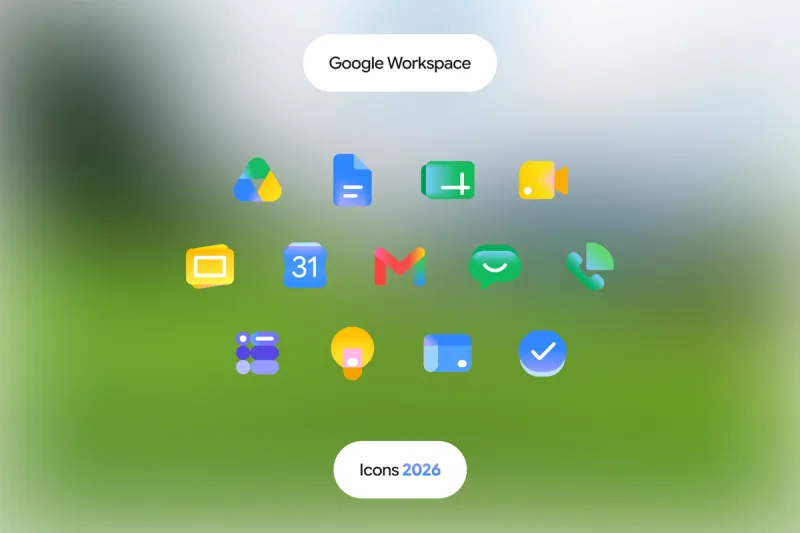
In late April 2026, 9to5Google published leaked images of a complete visual overhaul coming to all Google Workspace apps. Gmail, Drive, Calendar, Meet, Docs, Sheets, Slides, Keep, Voice, Tasks, Forms, Sites — thirteen icons, all at once, all getting rebuilt from scratch.
The reaction split immediately along predictable lines. Designers on Twitter said it looked beautiful. The top comment on the 9to5 article said it proved Google was "changing for the sake of change and never committing fully to their vision of design." Both camps were reacting to the wrong thing.
This redesign is not about how the icons look. It is about what Google is using them to say.
The problem that had been sitting there for years
To understand why this matters, you have to go back to the previous icon set and name the actual problem.
Google's Workspace icons all used the same four colors: red, blue, yellow, and green. Every app. Same palette, different arrangement. Docs was blue with red, yellow, and green accents. Calendar was blue with red, yellow, and green accents. Meet was green with red, yellow, and blue accents. Drive was a triangle of all four.
In theory, this was brilliant brand consistency. In practice, it created an icon drawer where almost everything looked like everything else.
A designer writing on Medium in early 2026 described the core tension precisely: when many icons share the same palette, differentiation shifts toward shape recognition — which takes longer, especially at small sizes. This is not an abstract criticism. It is a real usability failure at 16px, which is where most Workspace icons live in a pinned browser tab.
The new system attacks this directly. Each app now gets its own dominant color. Gmail is red. Calendar returns to classic blue. Chat is a nostalgic Hangouts green. Meet is yellow. Drive keeps green, yellow, and blue but drops red entirely. The four-color mandate is gone. Individual identity is back.
The gradient is not decoration
Here is what most of the coverage is getting wrong: the gradient treatment is not a style choice. It is a brand system signal.
Google started rolling out gradient icons in May 2025 when it updated the core Google G. Then Gemini. Then Google Photos. Then Google Maps. Now Workspace. The same aesthetic thread runs through every update — and the rationale is explicit. According to sources cited by 9to5Google, the gradient effect across all Workspace apps is there to reflect the presence of AI-powered features.
Gradient means AI is here now.
This is icon design as product communication. Google is using the visual layer to tell every user, every time they open their app drawer, that these are not the same tools they were five years ago. The aesthetic change is a claim about capability. The flat, four-color icons belonged to the pre-Gemini era. The gradient icons belong to what Google wants to be.
Whether you find this compelling or cynical probably depends on how much you trust the product claim. But as a design decision, it is coherent. The gradient is not random. It is load-bearing.
The page container decision is the most interesting one
One design choice in this redesign is getting less attention than it deserves: Google dropped the page container for most apps.
The previous generation of Workspace icons had a standardized white or light container shape — a page, a square, a rounded rectangle — that held the symbol. The new icons remove that container. The symbol floats freely, at full scale within the icon bounds, with a gradient fill.
This is a bigger decision than it sounds. The container was doing two things simultaneously: enforcing visual consistency across apps, and reducing the available space for the symbol itself. Removing it means each icon can now be more expressive, more distinct, and more recognizable at small sizes — but it also means the system can no longer rely on the container to create coherence.
The bet is that the gradient treatment provides enough visual unity to hold the system together without the crutch. So far, the leaked images suggest it does.
The Calendar exception is worth noting
Not every icon moved in the same direction. Google Calendar is the outlier.
The new Calendar icon moves away from the recent design language and returns to something closer to the older, skeuomorphic flip-calendar reference. The four-color exterior container is gone. Classic blue returns as the dominant color.
This is a deliberate throwback, and it is probably the right call. Calendar is one of the most used Workspace apps and one of the most recognizable. Its icon has strong existing mental associations. A radical departure would have created unnecessary friction. The new version keeps what works — the shape language, the single dominant color — and updates the rendering style without losing recognition.
It is also a reminder that good icon system design is not about applying the same rules to every app. It is about knowing when consistency serves users and when it gets in the way.
What this means for your visual system
Google's Workspace redesign is a useful case study for any product team thinking about icon or visual system design, for three reasons.
First: brand consistency and product differentiation are not the same goal. Google spent years optimizing for the former and ended up with a system that failed at the latter. The new system inverts the priority without abandoning the brand. Your design system faces the same tension at smaller scale. Making every component feel like it belongs to the same family is not the same as making every component feel identical.
Second: visual systems can communicate product positioning. The gradient treatment is not just decorative — it is telling a story about what these products are now. If your visual identity has not evolved since before a major product shift, it is probably telling the wrong story to users and prospects.
Third: rollout coherence matters as much as the design itself. Google did not update Workspace icons in isolation. It rolled out a gradient design language progressively — G first, then Gemini, then consumer apps, then productivity tools — so that by the time Workspace arrived, the language felt familiar rather than arbitrary. If you are planning a visual system update, the sequencing of what you change and when is a design decision in itself.
The icons look better. That is true. But the reason this redesign is worth paying attention to is not the aesthetics. It is the discipline behind the system — and the clarity of what Google is using it to say.
Your brand's visual system is telling a story. Make sure it's the right one.
See my services